
Veeam backups
VM protection and backup are an essential part of long-term infrastructure stability.
Built for ISO 27001NIS2 DORA

- Backup as a service
- Storage included
- Daily monitoring
Veeam Managed Backup: a backup service for your VMs
Backup as a service
Storage included
Daily monitoring
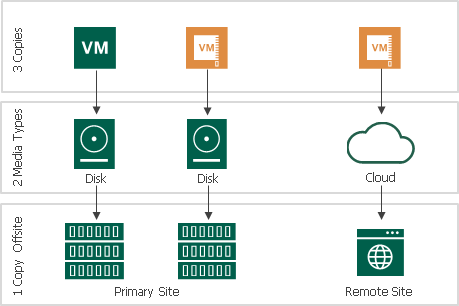
Automatic, transparent and with no impact on your available space
Backups of the VMs you select are made using MDP CLOUD Veeam servers. Your infrastructure management vLAN then moves your data to storage configured with RAID. Our team manages this operation completely. With this additional storage you will have more usable space in your infrastructure.
Achieve the 3-2-1 strategy in a few clicks
Deployed in 3 simple steps
An affordable and adaptable solution
Easily accessible backups
Frequently asked questions (FAQ)
What is the purpose of backups?
Specific business goals and priorities for backups can differ somewhat, but in general they ensure business continuity and protect valuable information from loss or disaster. MDP CLOUD builds a reliable technical architecture for your data backups and saves you time by freeing your staff from IT worries. We work mostly with VMs, using the Veeam Managed Backup solution.
Specific purposes of data backup for a business:
- Disaster recovery. Data backups help you resume operations quickly if equipment or a system fails, a disaster strikes (for example a flooded server room or a fire) or you suffer a cyberattack. They also shorten downtime.
- Prevention. Regular backups reduce the risk of data loss caused by accidental or human error or by malware.
- Protection against ransomware. Businesses are suffering more and more attacks of this kind. Backups are effective protection against them, because encrypted data can be restored from unaffected backups and there is no need to pay a ransom.
- Compliance and legal obligations. Many industries have strict data retention requirements. With a backup strategy and policy in place, you can meet your obligations and requirements.
- Protection of important data. Backing up protects intellectual property, customer data, financial records and proprietary information from unauthorised access and theft.
- Reputation protection. If you work with confidential data, a reliable backup strategy helps you maintain your company's good reputation.
Long-term archiving also deserves a mention. Data backups are also used as long-term archives of historical records, which make analysis, research and future decision-making easier.
Effective backup takes more than saving all your files to the cloud or to storage. You need to choose the optimal backup frequency, ensure data encryption, provide access on demand and more. MDP CLOUD takes care of this 24x7x365!
How do experts rate Veeam backup technology?
Cybersecurity and IT experts rate Veeam backup technology very positively. Companies of all sizes choose it for its ease of adoption, convenient user interface and flexible capabilities.
Experts are particularly impressed that the system can back up continuously. Fast, uninterrupted backup jobs ensure minimal downtime and maximally stable business continuity even when problems occur.
For a growing business it matters that Veeam Backup can meet even very rapid expansion requirements. It is a very scaling-friendly system. As you grow, the capacity of your data storage solutions is adapted too.
IT professionals who use Veeam Backup in their work stress that its recovery capabilities are very strong and that the results do not depend at all on the condition of the hardware. Even if internal systems fail, data that has already been saved can be restored with the highest accuracy. The friendly UI also earns high praise, as it lets even less experienced users make the most of the application's functionality.
The system has won more than one award and a lot of recognition from industry professionals and expert communities. Online you can also find many professional reviews in which individual users rate Veeam Backup as the best:
- Backup and recovery software;
- Cloud backup software;
- Disaster recovery software.
What are the stages of creating backups?
The stages of the process can vary somewhat, but MDP CLOUD customers most often create backups in roughly the following order.
- Planning. Identify the most important data and systems to be backed up. Define the backup frequency and retention policy inside the company and together with IT consultants.
- Choosing a backup method. The MDP CLOUD team will recommend a full, incremental or differential method based on data volume and recovery requirements.
- Configuring the backup software. We prepare the cloud storage(s) where your data will be available and accumulated.
- Creating data copies. This usually happens in the background and does not interfere with primary tasks. Data is uploaded to the cloud periodically, without overloading systems or causing difficulties for employees.
- Verification, rotation, monitoring. Check the status of your backups regularly. We recommend implementing backup rotation so that versions do not get confused. Watch for discrepancies so you can resolve them sooner.
By carrying out these steps carefully and working with the MDP CLOUD data storage and cloud administration team, companies can protect themselves against threats and feel confident about their business!
Related services
Microsoft 365 backup
Protect your data in Microsoft 365: Outlook, OneDrive, SharePoint and Teams.
Expertise confirmed by certifications
This service is delivered by specialists with valid international certifications. Their expertise is confirmed by independent organisations, not by us.
-
ISO/IEC 27001 Lead Implementer
The service is delivered in line with the requirements of an ISO/IEC 27001 management system.
-

Certified in Risk and Information Systems Control
Risks are assessed and controlled using the international IT risk methodology.
Get a personal quote
We reply within 1 business day